
Clearing a 32lue Code on your Solar Controller
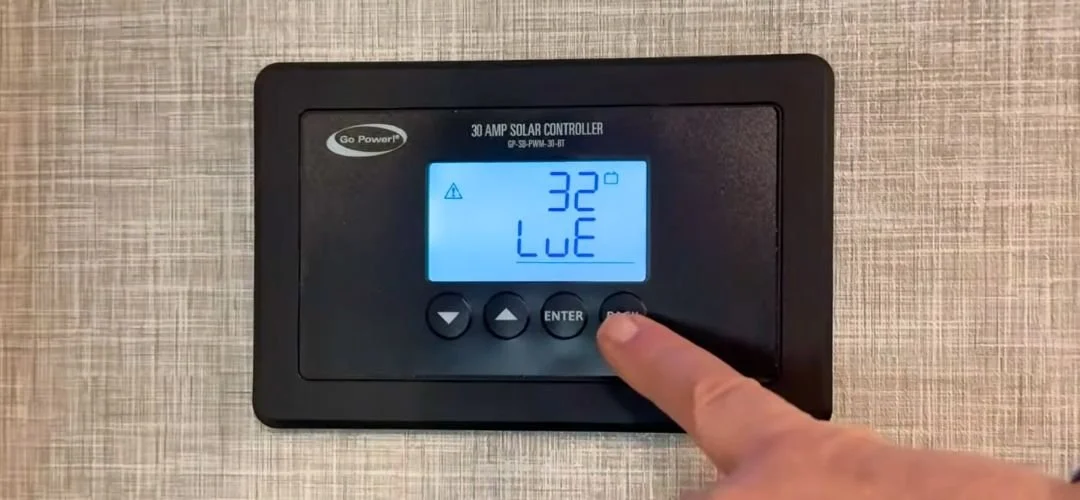
Is your RV’s 30 Amp GoPower Solar Controller not working or showing a 32LuE fault code?
The good news is that this can be a quick fix.
In this guide, we’ll walk through how to reset your GoPower solar controller, including a basic reset through the controller menu and a hard reset if the first reset does not work.
Before you start: If you are not comfortable working around RV electrical components, stop here and call RVFix. A certified RV technician can walk you through the issue on a video call and help you avoid damaging your system.
And if you’d rather see the process visually, we’ve included the full video walkthrough at the bottom of this page.
What a 32LuE Fault Code Means
A 32LuE fault code on a GoPower solar controller is commonly related to the controller not recognizing the battery.
That does not always mean the controller is bad.
It may mean:
The battery is very low
The battery connection is loose
The controller needs to restart
The lithium battery needs to wake up
The controller is not detecting battery voltage correctly
The first thing to try is a soft reset through the controller menu.
How to Reset a GoPower 30 Amp Solar Controller
There are two ways to perform a soft reset depending on how new your solar controller is. In recent models, all you have to do is press all four buttons simultaneously and hold them for a few seconds, and the system will do a soft reset.
If you have an older model, it’s slightly more complicated, but still quite simple:
Press the Back button to wake up the controller
Hold the Enter button
Scroll to number 2: Settings
Press Enter
Scroll to number 6: Reset
Press Enter again
Use the arrow button to select Yes
Press Enter to confirm
The controller should now restart, which usually takes around 10 seconds.
Once it comes back on, check the display. If the controller is showing correctly, you should see solar panel power coming in, along with readings like battery voltage and charging amps.
If you’re seeing all that, you should be good to go!
What If the Reset Doesn’t Work?
If the menu reset does not clear the issue, the next step is a hard reset.
A hard reset disconnects power from the controller long enough for it to fully restart and reconnect to the battery. Keep in mind, this is different than a factory reset. We prefer the hard reset method because we have found it to be more reliable.
Only do this if you are comfortable working carefully around low-voltage RV wiring. If you’re feeling unsure or nervous, you can call RVFix before disconnecting anything.
How to Hard Reset a GoPower Solar Controller
To perform a hard reset:
First, remove the trim ring around the solar controller. You can usually just do this by hand.
Then, remove the four screws holding the controller in place and gently pull the controller out from the wall.
Now you can see the wiring on the back of the controller. On many GoPower controllers, the lower terminals are connected to the battery, and the upper terminals are connected to the solar panel.
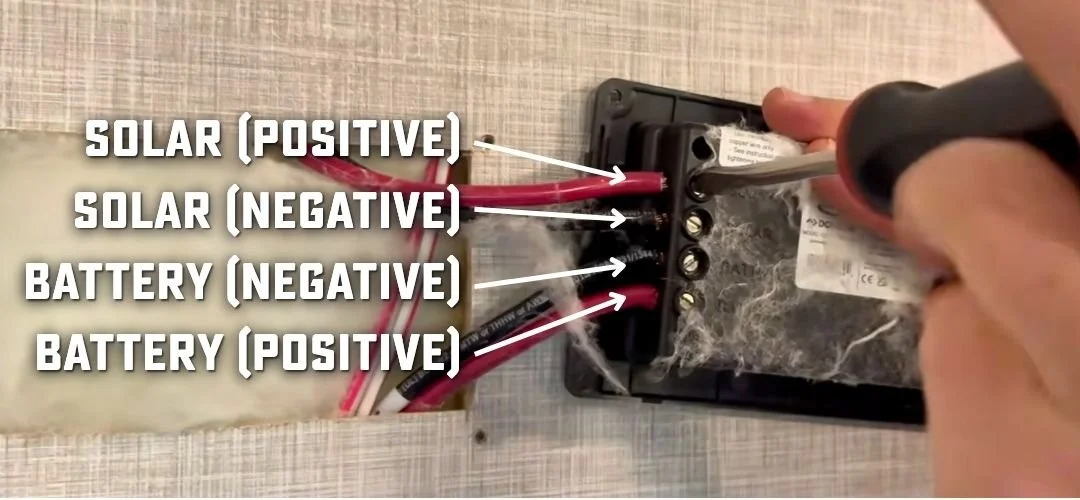
This is how the wiring will typically be connected, but double check that it is correct on your controller before unplugging anything.
Using a flathead screwdriver, carefully loosen the set screw for the positive solar wire and remove the wire from the controller. In many cases, this is the only wire that you’ll need to remove, but if it doesn’t work, you can also remove the positive battery wire as well.
Important: To be extra safe, you can cover your solar panel so it will not produce any power, but either way, be careful not to touch the exposed copper wires.
Do not let the wires touch any other terminals or wires.
Then let the controller sit disconnected for about 10-20 minutes.
In the meantime, this is a good chance to make sure that your battery has at least a little voltage before you reconnect so that the controller can sense the battery.
Then, you can reconnect the wires. If you removed the battery wire, start with reconnecting that one to give the system a chance to recognize the battery connection. Then reconnect the positive solar wire, tighten the set screws, and gently tug on the wire to make sure it is secure.
The controller should power back up. Once it does, check the display again to confirm that it is reading solar input, battery voltage, and charging amps.
If everything is showing correctly, your GoPower solar controller has been hard reset.
When to Call RVFix
If the controller still does not reset, does not power up, or continues showing a fault code, there may be a deeper issue with the battery, wiring, fuse, solar input, controller, or charging system.
If this reset does not solve your issue, don’t worry. RVFix is here to help.
Call 844-667-8349 to get help from a certified RV technician on a video call. We can help diagnose your solar charging issue, walk through safe troubleshooting steps, help with parts and warranty if needed, and coordinate service if your RV needs hands-on repair.
RVFix helps you get answers faster so you can get back to camping.
Watch the Full Video
Watch the full walkthrough below to see how to reset a 30 Amp GoPower Solar Controller and perform a hard reset if needed.
